PDF COMPARE PRO

Compare two PDF files online — word by word

See every addition, removal and edit between two PDF versions in seconds. Smart page alignment, ignore zones, OCR & AI Compare for scans and an AI summary of what changed — free, with no signup.

100% in your browser — files never leave your device
3 changes found
A · ORIGINAL
VS
B · REVISED
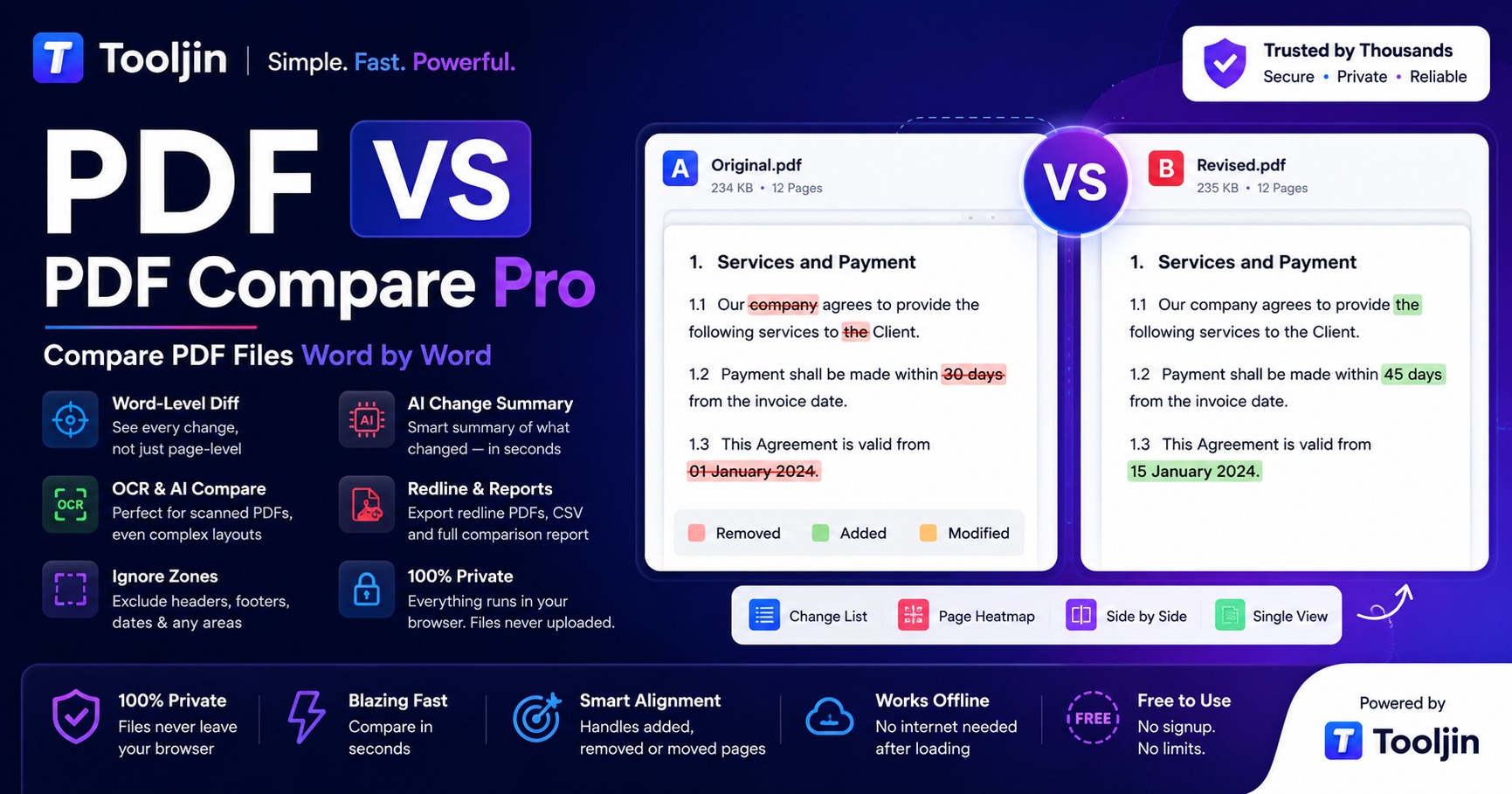
PDF Compare Pro — compare two PDF files word by word, with redline export, AI Compare for scans and an AI change summary
Word-level diff Smart page align Ignore zones AI Compare for scans OCR for scans AI summary Redline export

How to compare two PDF files online

Three steps, no installs, no account. Built for contracts, invoices, listings, reports and any document that goes through revisions.

1
Drop both versions

Add the original PDF as A and the revised PDF as B. Everything runs locally in your browser — nothing is uploaded.

2
Review every change

Additions, removals and edits are highlighted word-by-word with a clickable change list, page heatmap and three view modes.

3
Export the result

Download redline PDFs, a CSV change list, or a full comparison report — with an optional AI summary of what changed.

A serious PDF diff tool, not a pixel overlay

PDF Compare Pro reads the actual text layer of both documents, so the comparison survives reflowed paragraphs, font changes and re-exports.

True word-level comparison

Green for additions, red for removals, bright yellow for changes — every difference highlighted exactly where it sits on the page.

AI Compare for scans & photos

For tricky scans, photos and complex letterheads where plain OCR struggles, AI Compare reads both pages with Gemini Vision and pinpoints every change — right where it sits.

Smart page alignment

Inserted or deleted pages are re-paired automatically by content, so the rest of a contract or report stays perfectly comparable.

Ignore zones

Drag a rectangle over headers, footers, dates or page numbers and that region is excluded from the comparison on every page.

OCR for scanned PDFs

Scans are detected automatically; the free built-in OCR converts them to text right in your browser for a proper word-level diff.

Risk & category flags

Every change is auto-tagged — amounts, dates, numbers, legal terms — and high-impact edits are flagged so you review what matters before signing.

Three view modes

Side-by-side with synced scrolling, an overlay with adjustable opacity, and a swipe divider for instant visual checks.

Professional exports

Redline PDFs of either version, a CSV change list for spreadsheets, and a complete comparison report ready to share.

AI Change Summary

Long revision? Get a plain-language overview of what actually changed — grouped into pricing & numbers, dates & deadlines, legal & liability, and more — plus risk flags a reviewer must verify before signing. Your files are never sent: the AI only sees the extracted change text. Available on Pro and Business plans — 4 credits per summary.

AI Summary — Pro & Business
EXAMPLE OUTPUT

"The revised agreement raises the monthly fee from Rs 4,999 to Rs 5,499, moves the delivery deadline 15 days later, and removes the early-termination clause in section 4.2."

Pricing & NumbersDates & DeadlinesLegal & Liability
Verify: termination clause removed on page 6

Free where others charge

Most online PDF compare tools lock word-level comparison behind a paid plan and process your files on their servers.

FeaturePDF Compare ProTypical online tools
Word-level text comparisonFreeUsually paid
Files stay on your deviceAlwaysUploaded to servers
Smart page alignmentIncludedRare
Ignore zones (headers, dates)IncludedRare
OCR for scanned PDFsBuilt-inExtra cost
AI Compare for scans & photosPro plansNot available
Redline + report + CSV exportFreeVaries
AI change summaryPro plansNot available

Frequently asked questions

Everything about comparing PDF documents with Tooljin.

Is PDF Compare Pro free to use?

Yes. Comparing, redline exports, CSV and the PDF report are completely free. The optional AI Change Summary is available on Pro and Business plans and uses 4 credits per summary.

Are my PDF files uploaded to a server?

No. Both PDFs are processed 100% inside your browser and never leave your device. The optional AI Summary sends only the extracted change text, never the files.

Can it compare scanned PDFs?

Yes. Scanned documents are detected automatically. Use the free built-in OCR (English) to convert scans to text, or switch on AI Compare (Pro) — which uses Gemini Vision to read both pages and pinpoint every change, even on complex letterheads, photos and multi-column scans where plain OCR struggles.

What happens if pages were added or removed between versions?

Smart page alignment re-pairs pages by content, so an inserted or deleted page does not break the comparison of the remaining pages.

Can I exclude headers, footers or dates from the comparison?

Yes. Draw Ignore zones over any region — like headers, footers or page numbers — and those areas are excluded on every page.

Which export formats are supported?

Redline PDFs for both versions, a CSV change list, and a full comparison report PDF that can include the AI summary.

Is there a file size limit?

Each PDF can be up to 80 MB. Because processing happens on your device, very large documents depend on your browser's memory.

Which languages does the OCR support?

The built-in OCR currently supports English. PDFs with a real text layer compare in any language.
More PDF tools on Tooljin

One free toolbox for documents, images, SEO and e-commerce.

Ready to compare your PDFs?

Free, private, word-by-word — your documents never leave your browser.

Open PDF Compare Pro